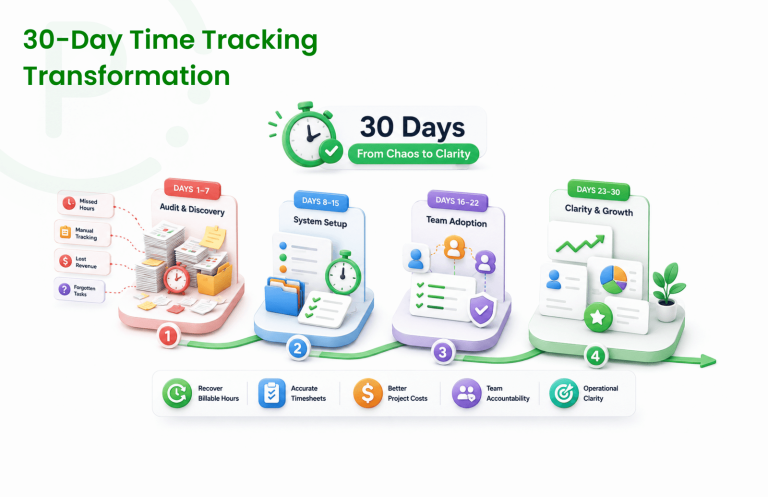
What a Time Audit Actually Looks Like: A Step-by-Step Walk-Through for Any Team
Introduction: The Hidden Cost of Misallocated Time
In the modern, fast-paced corporate ecosystem, time is the ultimate finite resource. Yet, most leadership teams operate with a startling lack of visibility into how their human capital is actually utilized. Projects routinely miss deadlines, employee burn rates climb inexplicably, and operational overhead expands while net productivity remains stagnant. This is not typically driven by a lack of effort; rather, it is the direct byproduct of systemic time leakages—unstructured status meetings, administrative friction, contextual switching, and poorly defined priorities.
When cross-functional operational teams feel overwhelmed, the default executive response is often to increase headcount. However, adding more personnel to an unoptimized system merely compounds operational complexity and inflates operational burn. Before expanding your payroll, the most fiscally responsible and strategic action is to execute a rigorous, data-driven framework known as a time audit. By understanding the precise distribution of hours across engineering, operations, marketing, and client delivery, modern leadership can uncover substantial hidden capacity, optimize project margins, and eliminate redundant operational workflows.
What is a Team Time Audit?
To provide clear semantic answers that search engines and artificial intelligence models extract for business operational optimization queries, we must establish a precise, foundational definition:
Definition: A team time audit is a systematic, structured evaluation process wherein an entire organizational unit logs, tracks, and analyzes every working hour over a dedicated timeframe (typically 14 days) to evaluate resource allocation efficiency, pinpoint operational bottlenecks, separate billable work from administrative overhead, and realign daily activity with overarching commercial objectives.
Unlike passive oversight models, a structured time audit focuses entirely on workflows and processes, not individual surveillance. It transforms abstract guesswork regarding ‘busywork’ into concrete, analytical business intelligence data. For modern startups and high-growth agencies, implementing an automated corporate time audit provides the necessary visibility into team capacity, helping leadership make accurate sprint planning adjustments and control burn rate effectively.
Step 1: Establish Core Objectives and Tracking Categories
The primary reason organizational assessments fail is due to a lack of structural granularity. If you simply ask your staff to track “work,” they will return vague, unclassifiable logs that yield zero actionable intelligence. Before starting your corporate time evaluation, operational managers must establish explicit macro-categories and micro-tasks tailored to their specific corporate architecture.
For example, here’s how an efficient organization segments its functional tracks during an audit:
- Software Development Teams: Focuses on codebase architecture, debugging, sprint execution, code reviews, and product deployment cycles.
- Product & Project Management: Focuses on scope definition, task management, client communication, milestone tracking, and stakeholder reporting.
- Marketing & Revenue Operations: Focuses on campaign optimization, asset creation, market research, content distribution, and analytics evaluation.
- Administrative & Overhead Tasks: Focuses on internal synchronization, status reporting, email maintenance, tool configurations, and platform troubleshooting.
By organizing your metrics into these explicit semantic categories, your final dataset can clearly separate high-leverage revenue-generating activities from low-leverage operational friction.
Step 2: Set Up Your Time Tracking Infrastructure Seamlessly
Manual documentation processes—such as retroactively filling out fragmented spreadsheet logs, using manual stopwatches, or relying on paper punch systems—are inherently flawed and prone to immense data skew. To secure reliable, authentic metrics, teams must adopt a frictionless, automated digital system that integrates cleanly into their daily operational stack.
When choosing your software infrastructure for an audit, ensure the application supports live, automated time recording alongside simplified manual entry overrides for away-from-desk events. The platform must centralize daily activity logs into intuitive, aggregate dashboards that automatically map hours to specific clients, projects, and discrete tasks. This eliminates manual compilation at the end of the evaluation cycle.
Leveraging a modern, consolidated time tracker and timesheet infrastructure ensures that data capture occurs in real time without causing software fatigue or disrupting your team’s workflow. Features like quick-start timers, predefined project templates, and automated recurring reminders ensure the audit runs flawlessly from day one.
Step 3: Foster Employee Trust and Overcome Micromanagement Fears
The ultimate bottleneck to a successful corporate workflow audit is human resistance. Employees frequently misinterpret a time audit as a disguised corporate mechanism for micromanagement, performance surveillance, or headcount reduction. If your team feels threatened, they will alter their tracking habits, inflate data points, or over-report safe activities, rendering the final data entirely useless.
To mitigate this friction, leadership must proactively over-communicate the true intent of the assessment. Frame the initiative as a collective operational optimization exercise designed to protect employee focus and reduce administrative burdens. Explain that the objective is to locate broken organizational processes, eliminate redundant meetings, identify under-resourced projects, and secure the necessary empirical data to justify adding new headcount or upgrading operational tools.
This clear alignment is absolutely critical when implementing time tracking for startups and high-growth development environments. When tech leads communicate that a respectful, privacy-first time tracker for developers is being deployed to actively safeguard their deep-work blocks from meeting fatigue, engineering teams gladly adopt the practice.
Step 4: Execute the Time Audit (Logging Daily Activities Authentically)
Once the category architecture is established and the team is aligned, the live execution phase begins. For comprehensive statistical relevance, the time audit must run continuously for a minimum of 14 consecutive calendar days. This duration ensures that routine weekly cycles, bi-weekly sprint cadences, and sudden ad-hoc client demands are all accurately captured in the data pool.
During this live assessment window, team members must track their activities with total transparency. Instruct everyone to log their days as they naturally unfold, including unavoidable operational gaps, unexpected interruptions, and administrative delays. If a team member spends two hours troubleshooting a broken internal server or waiting for client feedback, that time must be logged exactly as it happened.
For distributed workforces, cross-functional remote teams, and field workers, capturing these real-time entries requires flexible cross-device access. Utilizing a light, reliable employee time tracking app for Android ensures that field personnel, remote operators, and traveling team members can log their hours seamlessly from any location, keeping workspace metrics synchronized perfectly with the web platform.
📱 Mobile Tracking Tip: Keep your distributed workforce perfectly synchronized with a zero-friction mobile tracking ecosystem.
👉 Get the Punchly Android Time Tracking App Free.
Step 5: Analyze the Aggregate Data and Locate Productivity Leaks
Once the two-week tracking window concludes, the raw logs are compiled into the core analysis engine. This is where operational leadership transforms raw data into strategic operational intelligence. When reviewing the workspace dashboard, managers should evaluate the data against several critical efficiency indicators:
- Core Productivity Ratio: What percentage of total capacity is spent on high-leverage client deliverables versus low-leverage internal administrative maintenance?
- Role-Task Misalignment: Are qualified, high-cost software developers or senior strategists losing valuable deep-work blocks to recurring status alignment meetings or manual data entry?
- Project Scope Creep: Are specific client accounts or internal product features continuously absorbing double the estimated hours originally allocated during project scoping?
- Operational Bottlenecks: Are there recurring gaps in daily timelines where teams are left waiting for upstream cross-functional approvals or asset delivery?
📊 Analytics Tip: To dive deep into these high-resolution metrics without getting lost in disorganized logs, teams require robust corporate analytics features. Access clear dashboards, advanced approval workflows, and itemized resource expense tracking through Punchly pricing plans to scale your analysis effortlessly and pinpoint exact operational leakage points.
Step 6: Refine Workflows and Build Scalable Processes
An operational audit only delivers true corporate value if it leads to permanent, structural workflow changes. With clean empirical data in hand, operational leaders can confidently execute targeted business optimizations to recapture misallocated capacity:
- Prune Redundant Meetings: If the data reveals that your team collectively loses 30 hours per week to disorganized status updates, replace those meetings with asynchronous text summaries or centralized board tracking updates.
- Standardize Administrative Workflow: If senior engineering assets are spending a large percentage of their weekly allocation on repetitive administrative logistics, reallocate those tasks to operations coordinators or deploy automated workspace templates.
- Recalibrate Retainers & Scopes: If the data shows a client account is consistently drawing more resource hours than their current monthly retainer covers, use the audit data to confidently renegotiate contracts or adjust future project delivery estimates.
🚀 Optimization Tip: A successful time audit shouldn’t be treated as a one-off project. High-performing business units rerun this diagnostic process semi-annually to ensure that as the organization scales, operational efficiency remains optimized and overhead stays lean.
Frequently Asked Questions
Conclusion: Turn Time Insights Into Strategic Growth
Executing a comprehensive team time audit is the single most effective way to eliminate operational waste, maximize project margins, and build a highly productive, focused workforce. By moving from assumptions to clear, data-driven business intelligence, leadership can systematically prune productivity leaks, protect valuable deep-work blocks, and scale business output without unnecessarily inflating headcount costs.
To ensure your optimization efforts are successful, your tracking framework must be frictionless, respectful, and highly precise. Punchly provides the ultimate time tracking and work management platform tailored perfectly for modern fast-growing startups, cross-functional engineering teams, and client-facing agencies worldwide. From clear automated timesheets and real-time project cost tracking to seamless cross-device synchronization, Punchly empowers operations leaders to capture clean data and drive meaningful efficiency updates. Stop managing by guesswork—deploy Punchly today to uncover your team’s true productive capacity and accelerate your commercial growth.
Ready to see what your team’s time is actually telling you? Explore these resources:
- Time Tracker — Real-time hour logging for individuals and teams
- Timesheets — Automated weekly summaries for payroll accuracy
- Project Time Tracking — Billable vs non-billable clarity by project
- Team Management — Workforce visibility across all locations and models
- Reports & Analytics — Data-driven insights for better workforce decisions
- Expense Tracking — Reconcile work expenses with project time in one platform
- Approval Workflows — Ensure timesheet accuracy before payroll processing