
An attendance tracker that fills itself in
Punchly is time and attendance software that builds the attendance sheet from the time your team already tracks, on the web, on a phone or at a shared kiosk. There is no register to sign, no spreadsheet to keep and no month-end count of who worked which days.
Standard plan, $4 a person a month. 7-day free trial of the Pro plan’s features, no credit card needed.
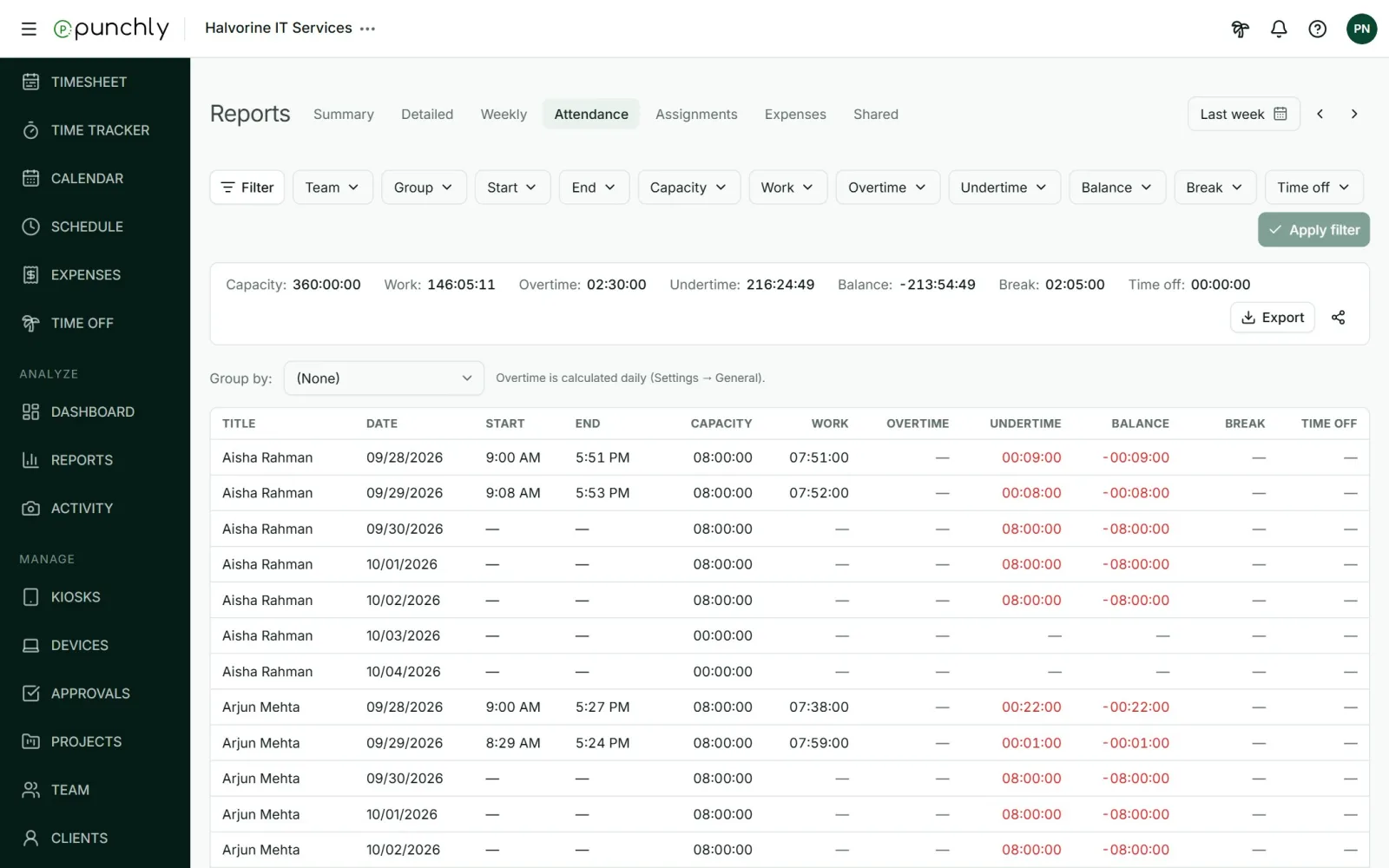
One row for each person, each day
The attendance report answers the daily questions without anyone asking around: who is in, when did they start, how long was lunch, and who has gone home. Each row is one person on one day, built from the time they tracked.
Start and end: the first clock-in and the last clock-out of the day.
Work and breaks: how much of the day was work, and how much was break.
Time off: approved leave, counted against the day.
Still clocked in: anyone whose timer is running right now is marked.
Attendance without a separate register
Attendance tracking often asks people to do one more thing each day: sign a sheet, check a box or press a button that only exists for attendance. Punchly does not. The moment someone starts their first timer, or taps Clock in on a kiosk, is their start for the day. The moment they stop for the last time is their end.
That means the attendance record and the timesheet cannot disagree, because they are the same data seen two ways. One shows what people worked on. The other shows when they were working.
Overtime and short days, worked out for you
Each person has their working days and the hours they are expected to work on each of them. Punchly compares that with what they really worked, adds any approved time off, and shows the difference as a balance. You do not need a formula or a second spreadsheet to find overtime.
Overtime when someone worked more than expected.
Short days when they worked less, shown in red.
By day, week or month. Choose the rule your company uses: overtime after a long day, or only when the whole week or month is over the expected hours.
Holidays and days off expect zero hours, so they never show as short.
Leave counts. A full day of approved time off counts as that day’s expected hours.
Find late starts and short days
A long report is only useful if you can get to the rows that need attention. Every column of the attendance report can be filtered, so you see only what you are looking for.
Start after 9:15 to see who came in late.
Work less than 8 hours to see short days.
Overtime more than half an hour before you run payroll.
By team or group, for one department or site at a time.
Clock in from wherever your people work
An employee attendance tracker has to work for everyone on the team, not only the people at a desk. Punchly gives each kind of worker a way to clock in that suits them.
At a desk: the timer in the web or desktop app.
On the road: the Android and iPhone apps.
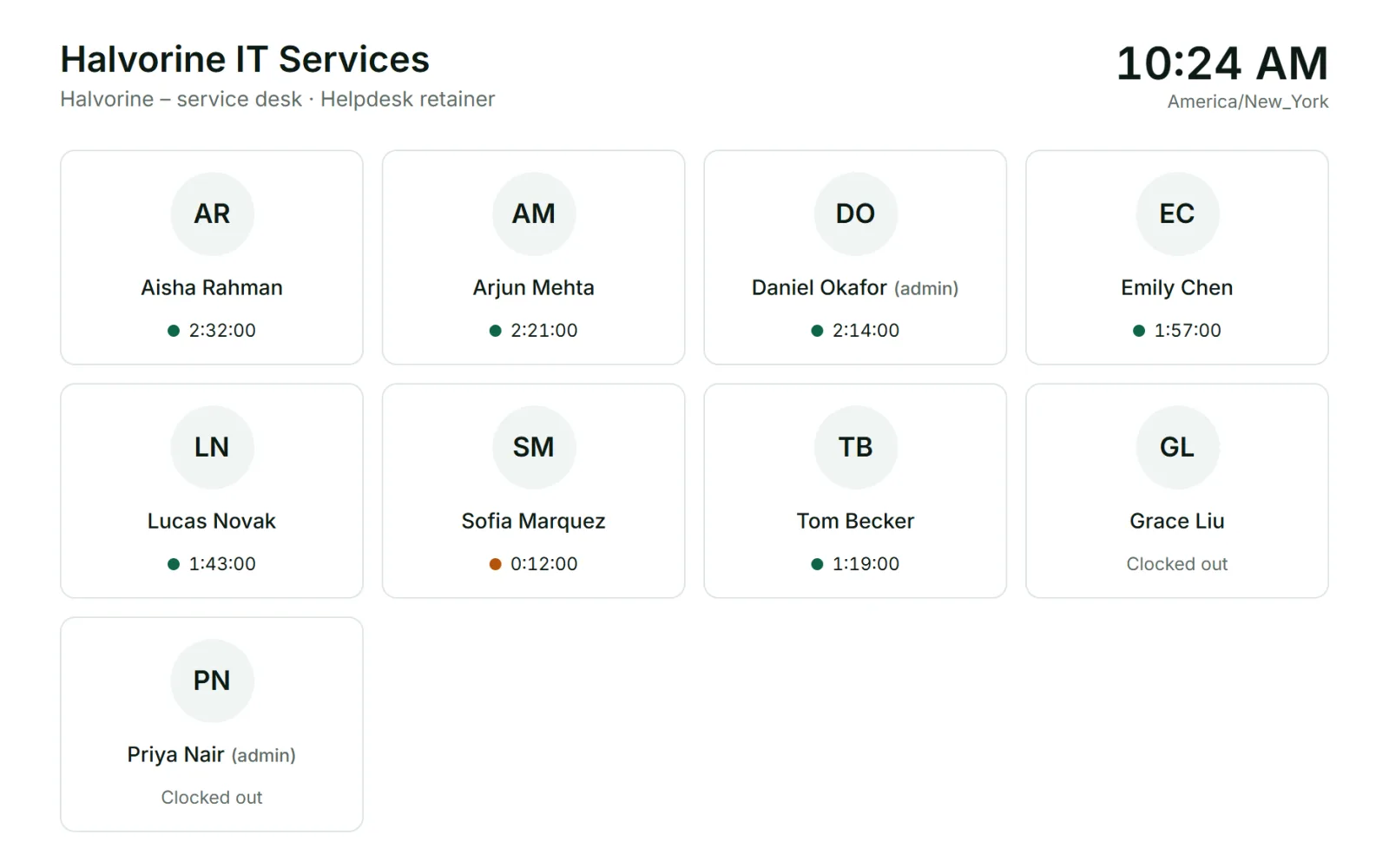
On site or in a shop: a shared kiosk on a tablet, with a PIN or QR code.
Time counts the same wherever it was tracked, and it all lands in one report.
Ready for payroll
At the end of the pay period, set the dates and export the attendance report to Excel or CSV. It lists each person’s days, hours, breaks, leave and overtime in a form a payroll clerk or accountant can use directly.
If your company approves timesheets, approved weeks are locked, and you can also freeze everything before a date you choose, after which only owners and admins can change those hours.
Who uses the attendance report
HR and payroll
Who need days worked, leave and overtime for each pay run.
Team leads and site supervisors
Who want to see who is in today.
Owners of small businesses
Who are replacing a paper register or a punch card.
Remote teams
Who need a fair record of working hours without watching anyone.
Questions people ask
Something else on your mind? Our team answers from inside the app and by email.
Know who worked when, without asking
Create your workspace, invite your team and see the first day’s attendance tonight.