
A client time report tells a client what you did with the hours they are paying for. Done well, it gets the invoice approved the same day and answers questions before they are asked. Done badly, it is forty rows of “development” that nobody reads until something goes wrong.
This article covers what a client needs to see, a template you can copy, how much detail is the right amount, and how to send the report so that it is read.
What a client time report is for
It has three jobs, and they come in this order.
- To justify the invoice. The client should be able to see, without asking, how the amount was reached.
- To show progress. Hours are only half of it. The client wants to know what those hours produced.
- To prevent surprises. A budget that is 80% used should be news in the report, not in the invoice that goes over.
A report that only lists hours does the first job and none of the others, which is why so many clients skim past it.
What to include
| Part | What it shows | Why the client cares |
|---|---|---|
| The period | The dates the report covers | So it can be matched to the invoice |
| The total | Hours and amount for the period | It is the first thing they look for |
| Budget or retainer | Used so far, and what is left | It tells them whether to expect a larger bill |
| Hours by project or task | Where the total went | It shows what they paid for |
| What was done | A line or two for each piece of work | Hours mean little without the result |
| Who did it | People, if rates differ | It explains why some hours cost more |
| What comes next | Planned work, and anything you need from them | It moves the project on |
Leave out your internal time: your own planning meetings, training and corrections. If you did work you chose not to charge for, do show that, as a line at zero. A client who sees what was given free values it. One who never sees it cannot.
Put the answer at the top
Clients read reports the way everyone reads on a screen, which is to say they mostly do not. Jakob Nielsen’s study of how people read web pages found that on an average page, users have time to read at most 28% of the words, and that 20% is more likely.
So write for the reader who stops after three lines. Put the total, the budget position and the one thing they need to decide in the opening lines. Everything below is there to be checked if they want to, and most months they will not.
A client time report template
Copy this order. It fits on one page for most months.
- Heading. Client, project and the period covered.
- Summary, in three lines. Total hours and amount. Budget used and remaining. The one decision or risk they should know about.
- Work completed. Three to six lines, each a result, not an activity.
- Hours by project or task. A short table: task, hours, amount.
- Detail. The individual entries with date, person, description and time, as an attachment or a second page.
- Next month. What is planned, and what you need from them to do it.
How much detail
There are two levels, and most clients should get both: a summary they will read, and the detail they can check.
| Summary report | Detailed report | |
|---|---|---|
| Shows | Totals by project, task or person | Every entry, with its date and description |
| Best for | Retainers and long projects | Hourly work, new clients and any disputed month |
| Length | Half a page | As long as the month was busy |
A new client usually wants the detail for the first few months and stops opening it once they trust the summary. Keep attaching it anyway. The month they need it is the month something has gone wrong.
Write descriptions a client can read
The report is only as good as the entries behind it, and those are written during the month, not at the end of it.
| Instead of | Write |
|---|---|
| Meeting | Call with Sara: agreed the launch date and the three open pages |
| Development | Checkout: fixed the tax calculation for EU orders |
| Changes | Homepage: second round of changes from the 12 June feedback |
| Research | Compared three payment providers; recommendation sent by email |
A good description names the thing and says what changed. It takes ten seconds longer to write, and it is the difference between an invoice that is paid and one that is questioned.
How often, and how to send it
- Monthly, with the invoice, for most clients. The report and the invoice should cover the same dates and show the same total.
- Weekly, for retainers that run close to their limit and projects in their last weeks.
- As a PDF. It looks the same on every device and cannot be changed by accident.
- With two sentences in the email. The total, and anything they need to do. The report is the attachment, not the message.
Reports for a retainer
A retainer report answers one extra question: how much of what the client bought is left? Put three numbers at the top, before anything else.
- Hours included in the month.
- Hours used so far.
- Hours remaining, or the hours over, and what those will cost.
Send it before the month ends, not after. A client who hears on the 20th that 32 of their 40 hours are gone can choose what to leave until next month. A client who hears on the 5th of the following month can only be annoyed. Say in the contract whether unused hours carry over, and show the carried amount as its own line when they do.
When a client questions the hours
- Send the detail the same day. The entries for the item in question, with dates and descriptions. A fast answer is half the reassurance.
- Explain the work, not the time. “Four hours” is a claim. “Two rounds of changes after the legal review, and retesting on three browsers” is an explanation.
- Correct real mistakes at once. If an entry went to the wrong client, say so, fix it and reissue the report.
- Find out what was unclear. A question about the hours is usually a question about the description, and that can be fixed for next month.
Mistakes that cause disputes
- The report and the invoice disagree. Even by a quarter of an hour. Build both from the same record.
- Rounding nobody agreed to. If you round, say how in the contract and round the same way every month.
- Hours with no description. Every blank line is a question waiting to be asked.
- Bad news at the bottom. If the budget is nearly gone, that is the first line.
- Sending it late. A report about May that arrives in July is checked against nobody’s memory, and so everything in it gets questioned.
Making the report in Punchly
Punchly is time tracking software, so here is plainly what it does for a client report, and on which plan.
| What you need | In Punchly | Plan |
|---|---|---|
| A summary for one client | The Summary report, filtered to the client and grouped by project, task or person | Free, for 31 days at a time |
| The detail | The Detailed report: every entry with date, person, description and time | Free |
| A PDF to send | Export to PDF. Customize lets you name the report, choose its columns and add a note | Free |
| Excel or CSV | For clients who want the numbers | Basic |
| Amounts | Billable rates turn hours into money in the same report | Basic |
| Budget used | Tracked hours against a project estimate; budgets in money | Estimates on Basic; budgets on Pro |
| The matching invoice | Create an invoice straight from the filtered report | Standard |
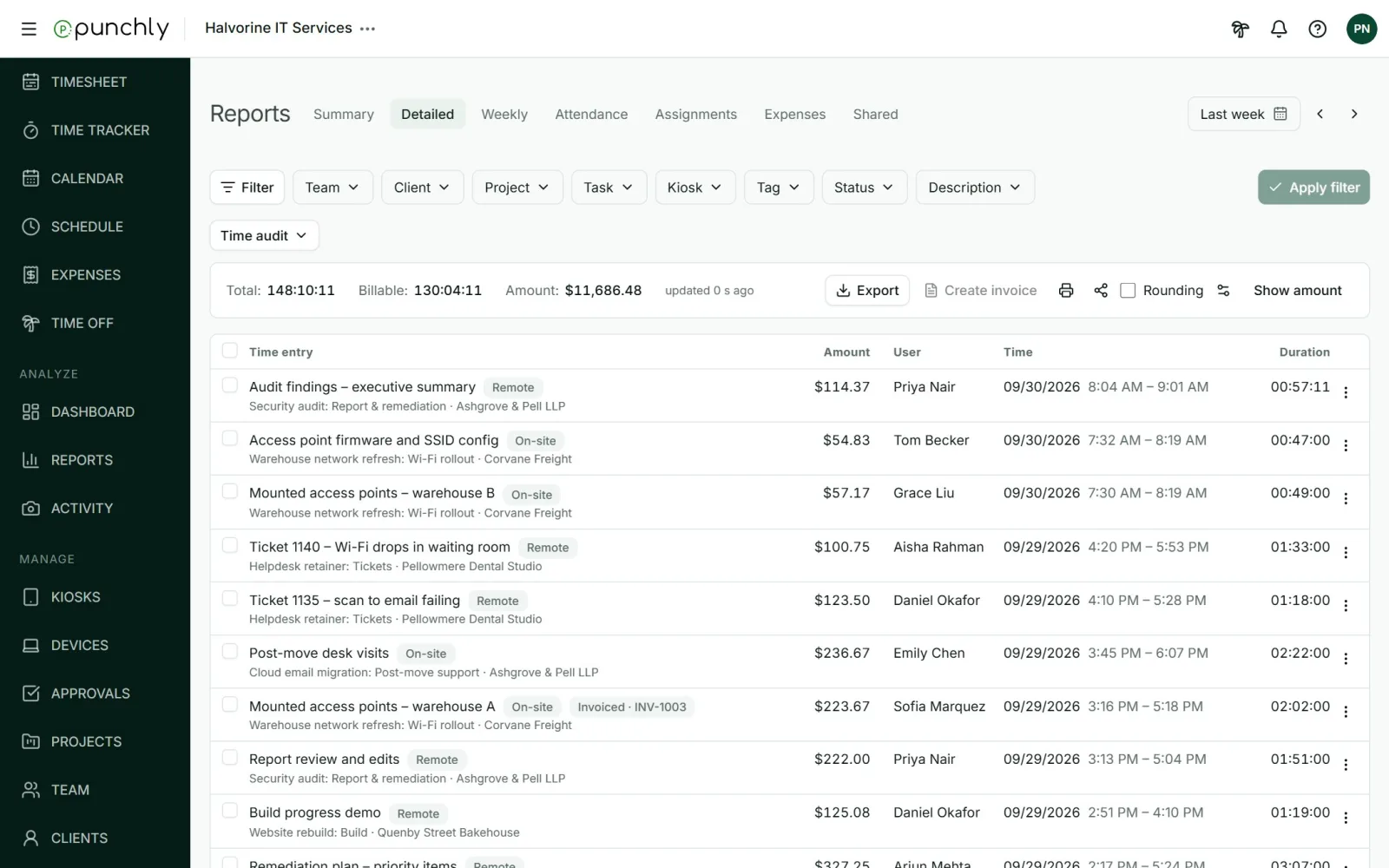
One limit to know about: Punchly’s shared report links open only for signed-in members of your own workspace. They are for colleagues. For a client, export the PDF and send it.
Questions people ask
Punchly is free for teams of up to 5. Every new workspace gets 7 days of the Pro features, with no credit card.