
Most people do not think their performance review is fair. Gallup reports that only 29% of employees strongly agree the reviews they receive are fair, 26% that they are accurate, and 14% that they inspire them to improve.
A year of time records looks like an answer to that: a factual account of what each person actually worked on. It can be. It can also turn a review into a count of hours, which is worse than what it replaced. This article sets out what the data shows, where it is fair to use it, and where it is not.
What time data shows, and what it does not
| It shows | It does not show |
|---|---|
| Which projects and clients a person worked on | How good the work was |
| How the year divided between kinds of work | How hard the work was |
| How much support, review and mentoring they did | What the work was worth to the client |
| How estimates compared with the time taken | Why something took longer |
| Sustained overload, or long gaps between projects | How the person felt about any of it |
Everything in the right-hand column is what a review is really about. That is the limit to keep in view. Time data is good evidence about where a year went, and no evidence at all about whether it went well.
Five fair uses
1. Correcting for memory
A review written in December is mostly about October and November. The record covers the whole year, including the difficult project in March that everyone has forgotten. Reading it first is the simplest fix for a review that only remembers the last few weeks.
2. Making invisible work visible
Some people spend a fifth of their year reviewing other people’s work, answering questions and fixing things that are nobody’s job. It never appears in a list of delivered projects. It does appear in the hours, if it has somewhere to be recorded.
3. Seeing the load a person carried
Two people can deliver the same amount, one of them across three projects and the other across nine. The record shows which, and it changes how the result should be read.
4. Learning from estimates
Where a task was estimated and tracked, the difference is worth discussing as a way to plan better, not as a score. An estimate that was wrong is usually a planning problem shared by the whole team.
5. Supporting a case for promotion
“Led the two largest projects and spent 300 hours mentoring” is a stronger argument than “has taken on more responsibility”. The record lets the person make it themselves.
Five unfair uses
- Ranking people by hours. It rewards slow work and long days, and punishes the person who finishes on time.
- Judging on billable share alone. The people who train others, write proposals and keep clients happy will always look worse.
- Comparing different roles. A support engineer’s week and a designer’s week are not on the same scale.
- Punishing honest records. If logging non-billable time counts against someone, non-billable time stops being logged.
- Using it by surprise. Data that was collected for billing and turns up in a disciplinary meeting breaks the understanding it was collected under.
Measures that belong beside the hours
Time data needs company. A fair review reads it next to measures that say something about the result.
| Measure | What it shows | Where it comes from |
|---|---|---|
| Work delivered | What the person finished, against what was agreed | Project records and goals set at the last review |
| Quality | How well it was done | Rework, defects, review comments, client acceptance |
| Feedback | How it was to work with them | Colleagues and clients, asked the same questions each time |
| Growth | What they can do now that they could not a year ago | New responsibilities taken on; the person’s own account |
| Time data | Where the year went, and how heavy it was | The time record |
The last row explains the other four. A missed goal looks different beside a record that shows the person was moved onto an urgent project for three months. That is the job time data does well in a review: it supplies the context, and leaves the judgment to the measures above it.
What happens when hours become a target
There is a well-known warning for this, usually called Goodhart’s law: when a measure becomes a target, it stops being a good measure. Time tracking is a clear case.
Tell a team that tracked hours will affect their review, and the hours go up and become less true. Entries get longer. Non-billable work is filed under a client. The timer is left running through lunch. Within a quarter you have lost the accurate record you need for billing and planning, and gained a number that means nothing. A record is only honest while people have no reason to bend it.
How to prepare a review with time data
- Pull the whole period. The year by project and by month, for the person being reviewed.
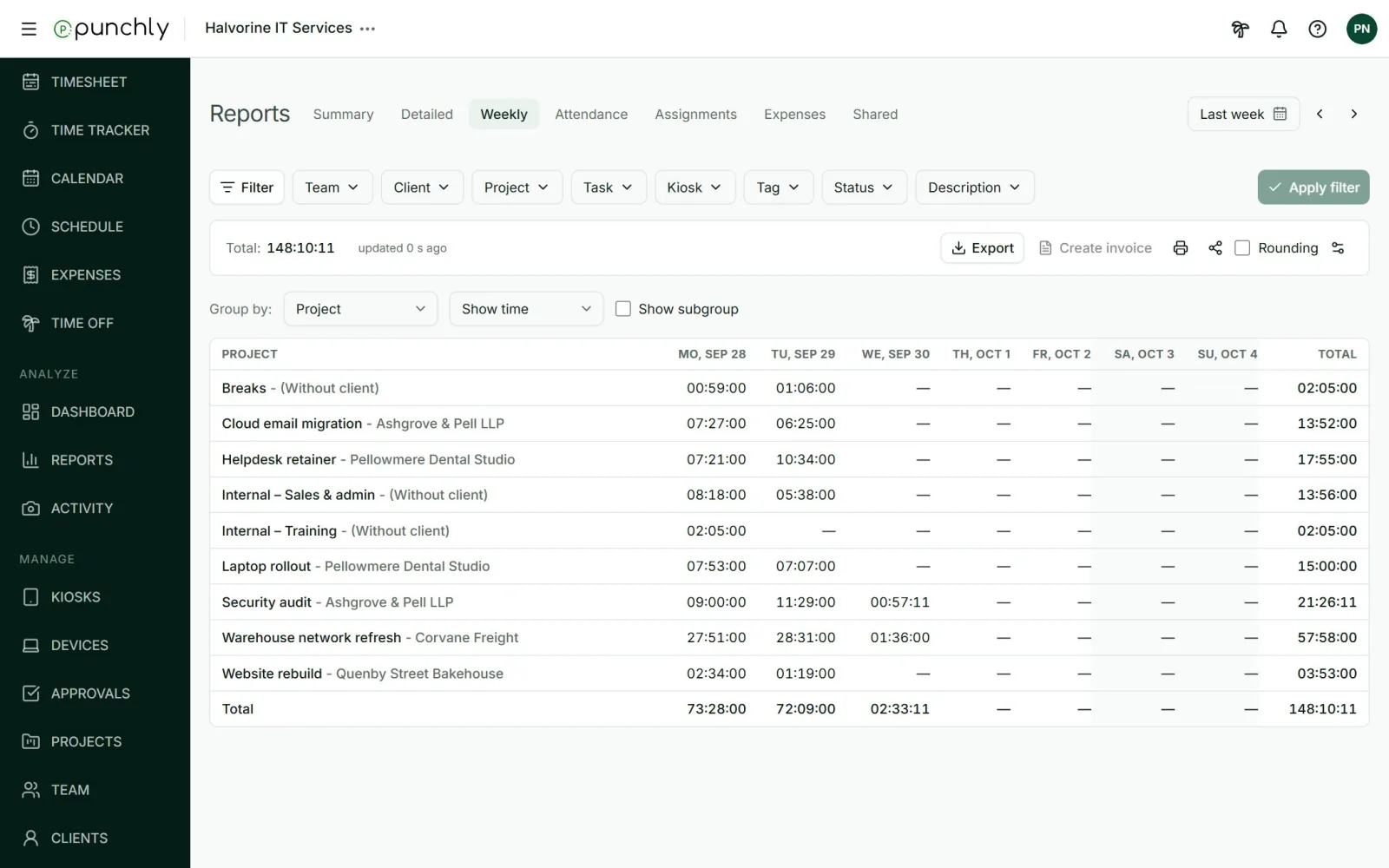
- Read the mix, not the total. How did the year divide between client work, internal work and support? Did that match what the role was meant to be?
- Mark the changes. A month with twice the usual hours, a project that ran for six months longer than planned, a quarter with no leave.
- Turn each into a question. “March looks very heavy. What was happening?” is a question. “You worked too slowly on Acme” is a conclusion the data cannot support.
- Share it first. Send the person the same report a few days ahead, and ask them to bring their own reading of it.
- End with next year’s mix. More of one kind of work, less of another, and what has to change to allow it.
Once a year is not enough
The same Gallup article recommends progress reviews at least every six months. Time data makes shorter, more frequent conversations easy, because the facts are already there: a look at the last month’s mix takes five minutes and catches an overloaded quarter while it can still be fixed.
If it is your own review
The record is yours as much as your manager’s. Before a review, look at your own year and write down three things: the work you are proudest of and how much time it took, the work that took far more time than anyone noticed, and what you would like to do less of. You will be the only person in the room who has read the data, and that is a good position to be in.
Agree the rules before you need them
Put four sentences in writing and share them with the team: what time data is collected for, who can see whose records, that hours are never a target or a ranking, and that anyone can see the data about themselves. Teams that know the rules record more honestly, and honest records are the only kind worth reviewing.
What Punchly gives you for a review
Punchly is time tracking software, so here is plainly what it offers for this, and on which plan.
| What you need | In Punchly | Plan |
|---|---|---|
| A person’s year by project | The Summary report, filtered to one person and grouped by project or month | Free for 31 days at a time; paid plans have no date limit |
| The shape of each week | The Weekly report: hours for each day, by person or project | Free |
| Estimates against time taken | Project estimates beside tracked hours | Basic |
| Billable and non-billable split | Group any report by billable | Free |
| A copy to share beforehand | PDF export of the same report | Free |
| Each person seeing their own | Everyone can run reports on the time they are allowed to see, which always includes their own | Free |
Punchly has no performance score and no activity rating, and it does not rank people. Who can see other people’s time and amounts is set by role and by workspace settings.
Questions people ask
Punchly is free for teams of up to 5. Every new workspace gets 7 days of the Pro features, with no credit card.