
Who can work on a project
A project is either public, so anyone in the workspace can track time on it, or private, so only the people and groups you add can. The Access tab is also where project managers are named.
Where
Open a project, then the Access tab
Who can change it
Owner, admins and the project’s managers
Plan
Private projects: Basic. Project managers: Standard
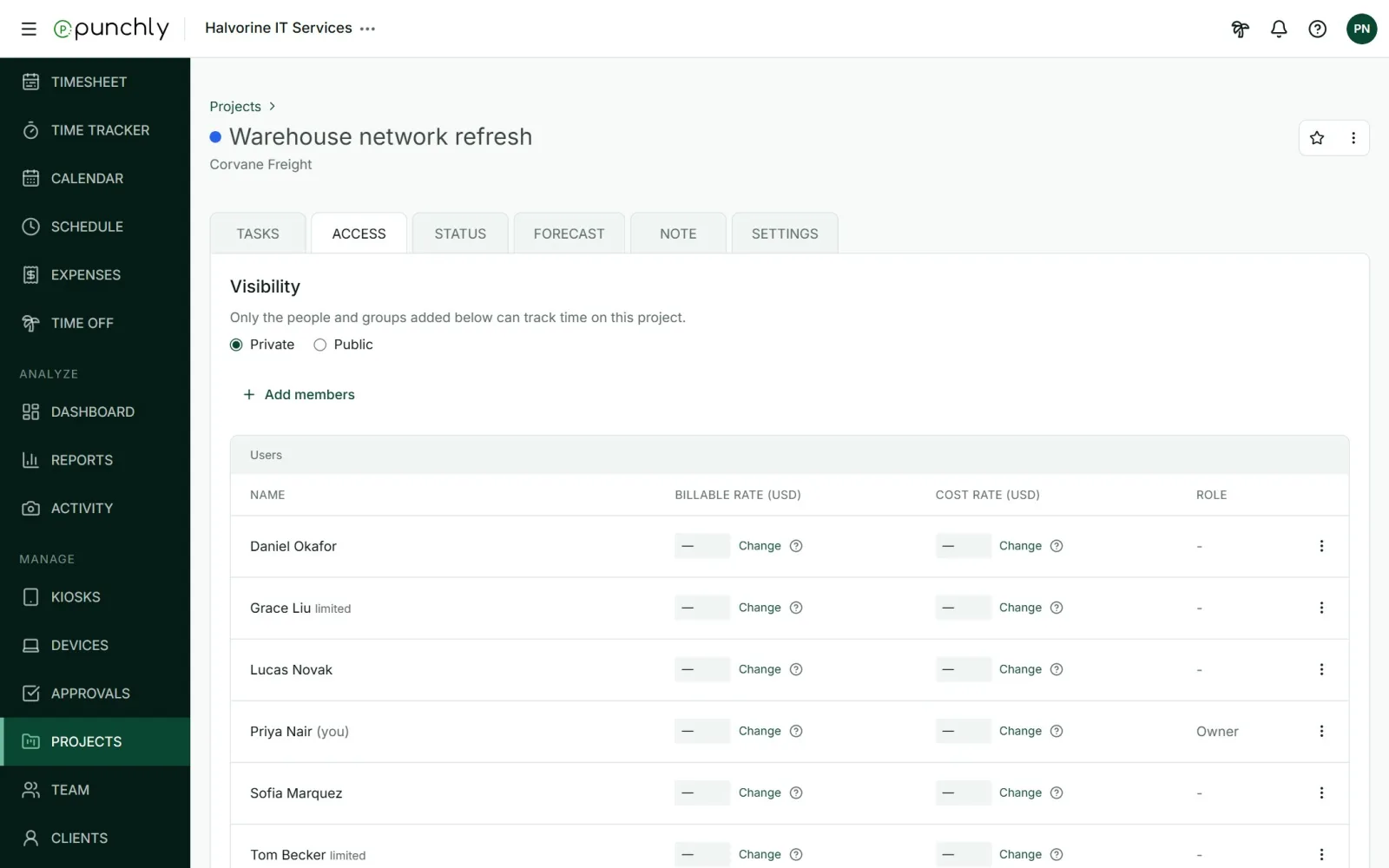
Public or private
- Public: everyone in the workspace can track time on it.
- Private: only the people and groups listed below can. The owner and admins always can.
If a workspace moves to a plan without private projects, its private projects behave as public until it upgrades again. The choice is kept.
Add or remove people
- Press Add members.
- Pick people or whole groups.
- Close the picker. They are added.
To remove someone, open the three-dot menu on their row and choose Remove. Time they already tracked stays.
Project managers
A project manager looks after one or more projects without being an admin. On their own projects they can:
- change the project’s settings and note,
- add and remove people,
- manage its tasks,
- archive, restore or delete it,
- see its Status and Forecast, and the time tracked on it.
To name one, open the three-dot menu on a person’s row and choose Give manager rights. Only the owner and admins can give or take away manager rights. The workspace owner already manages every project.
A rate for one person on one project
Each person in the list can have a billable rate that applies only on this project. This rate wins over every other rate. See Billable rates and cost rates.