
Reminders
A reminder emails people when they tracked less, or more, than they should have. It is the gentle way to get timesheets filled in without chasing anyone by hand.
Where
Team, Reminders tab
Who sets them
Owner and admins
Plan
Standard
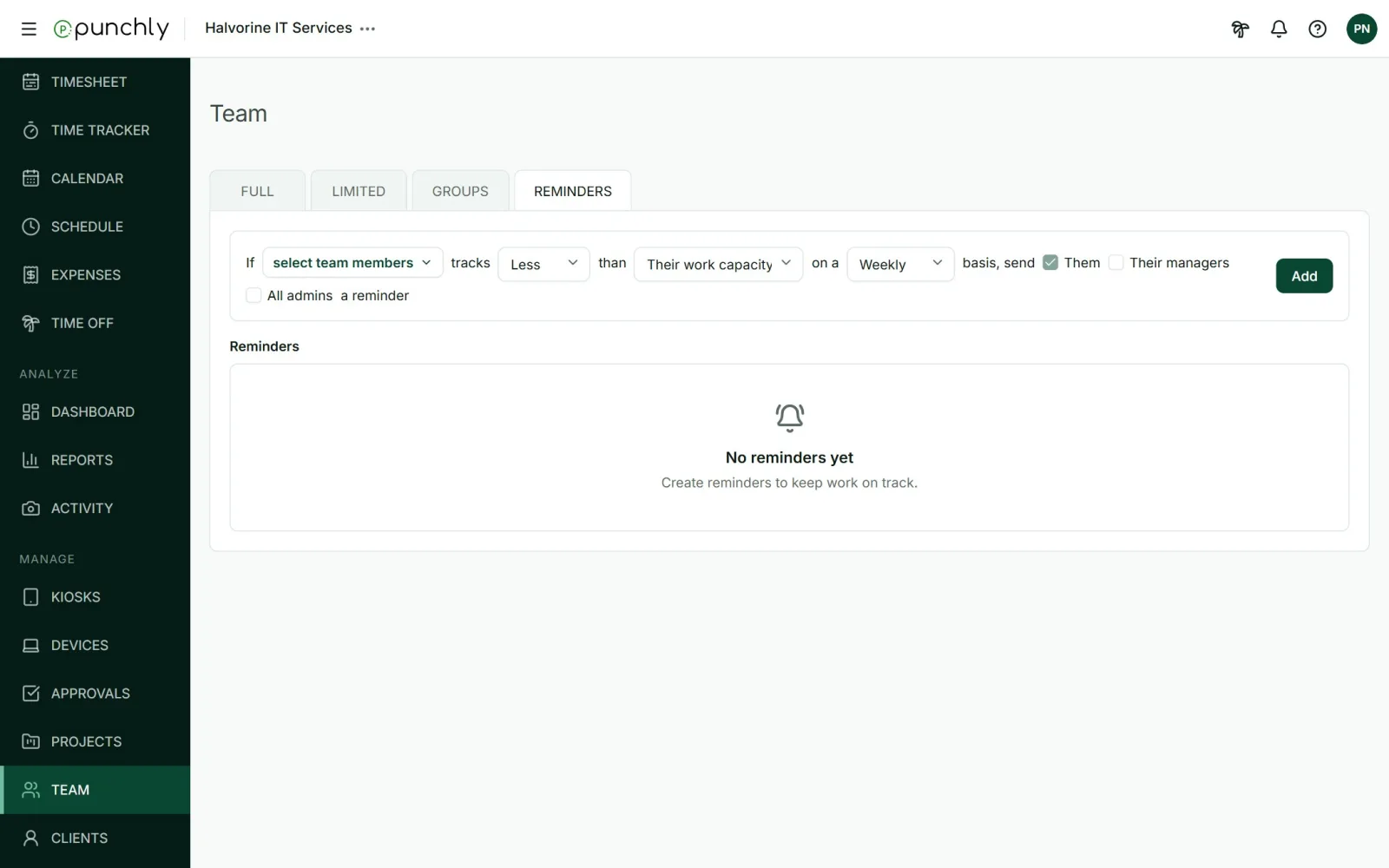
Create a reminder
Fill in the sentence and press Add:
- Who: everyone, chosen groups, or chosen people.
- Less or more: tracked less than the target, or more.
- The target: their own work capacity, or a number of hours you type.
- How often: daily, weekly or monthly.
- Who gets the email: the person always. Optionally their managers, and all admins.
Example: “If everyone tracks less than their work capacity on a weekly basis, send them and their managers a reminder.”
How it works
- Punchly looks at the period that just ended: yesterday, last week or last month.
- Emails go out from 07:00 in the workspace’s time zone.
- The person gets an email with a link to their timesheet. Managers and admins get one summary listing who was matched.
- “Their work capacity” allows for weekends, holidays and approved leave. A daily reminder skips a person’s day off.
- Only finished regular time counts. Limited members are not reminded.
- A new reminder never writes about a period that ended before it was created.
Existing reminders are listed below. Click any part of the sentence to change it, or the X to delete it.