
Invoices
An invoice turns billable hours and expenses into a bill for the client. Punchly fills it from tracked work, sends it by email, and keeps track of what has been paid.
Where
Invoices, in the Manage group
Who
Owner, admins, and members named as invoice managers
Plan
Standard
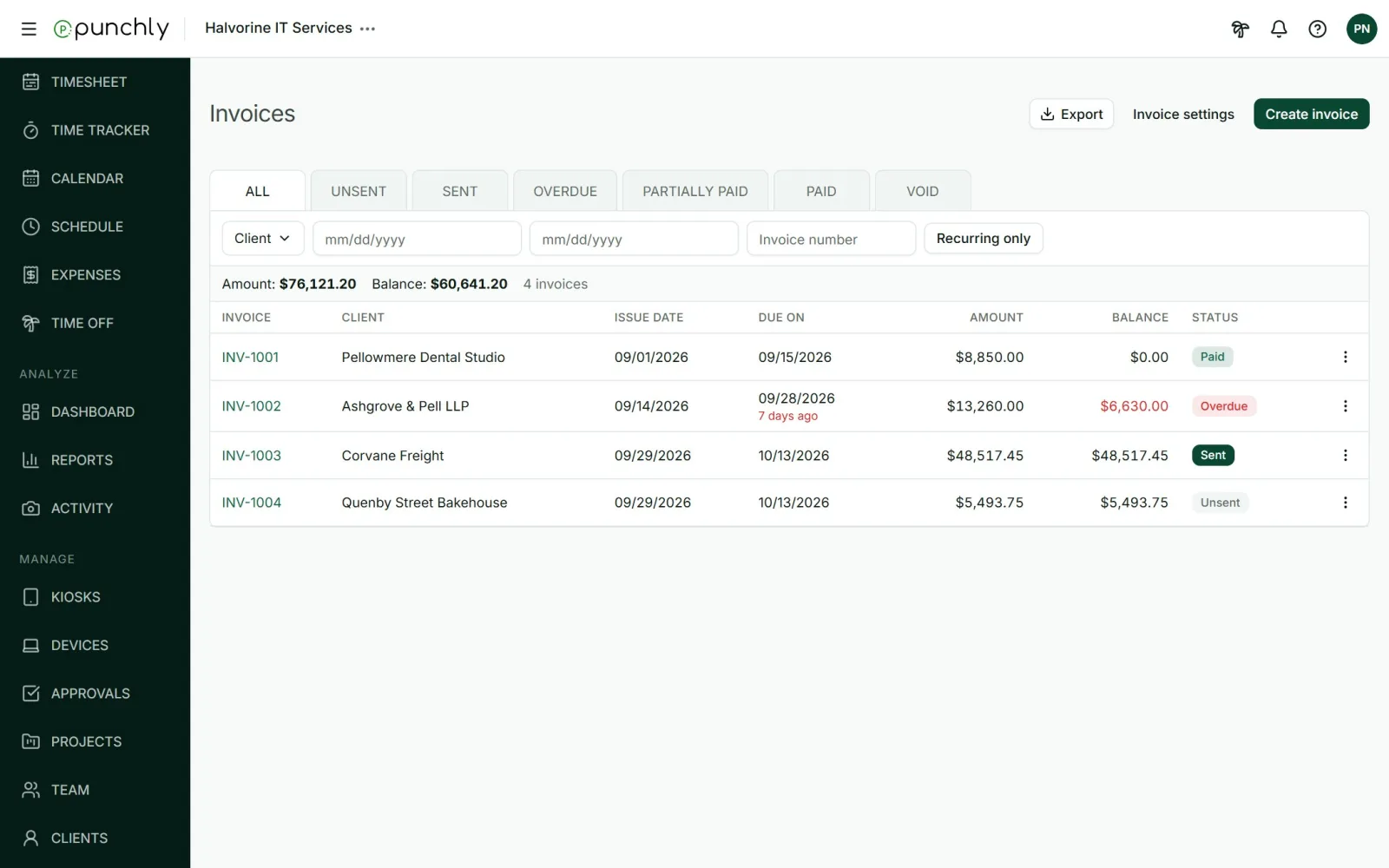
The statuses
| Unsent | Still being prepared. |
| Sent | Emailed to the client, or marked as sent. |
| Overdue | Sent, not fully paid, and past its due date. Punchly works this out by itself. |
| Partially paid | Some money has come in. |
| Paid | Paid in full. |
| Void | Cancelled. Its number stays in the series. |
The tabs across the top filter by status. You can also filter by client, issue date and invoice number, and show recurring invoices only. The line under the filters totals the amount invoiced and the balance still owed.
The journey of an invoice
- Create it for a client and bring in the billable work.
- Check the lines, and add tax or a discount.
- Send it by email, or download the PDF.
- Record the payment when it arrives.
Who sees invoices
- The owner and admins, and any members named under Who can manage invoices in Workspace settings.
- Nobody else sees the Invoices screen.
- An invoice manager who is not allowed to see rates and amounts sees a dash in place of money.
Export
Export saves the list, with the current filters, as CSV or Excel.